A practical check before November travel
A phone that works comfortably on home Wi-Fi can present a different decision on a limited travel plan. Before opening a room, establish the connection and the amount of data you are willing to use. This is a seasonal planning guide, not a claim of a new PrivateLola feature, a measured traffic trend or a tested streaming rate. Official device documentation was reviewed on 20 November 2026.
Separate browsing the directory from entering the provider’s room. Reading a guide, loading a listing and watching live media are different activities. We have not measured their data consumption on your device. A provider’s credit figure cannot tell you how many megabytes the network connection will transfer, and your phone plan cannot tell you what the provider will charge.
Turn a bitrate into an understandable example
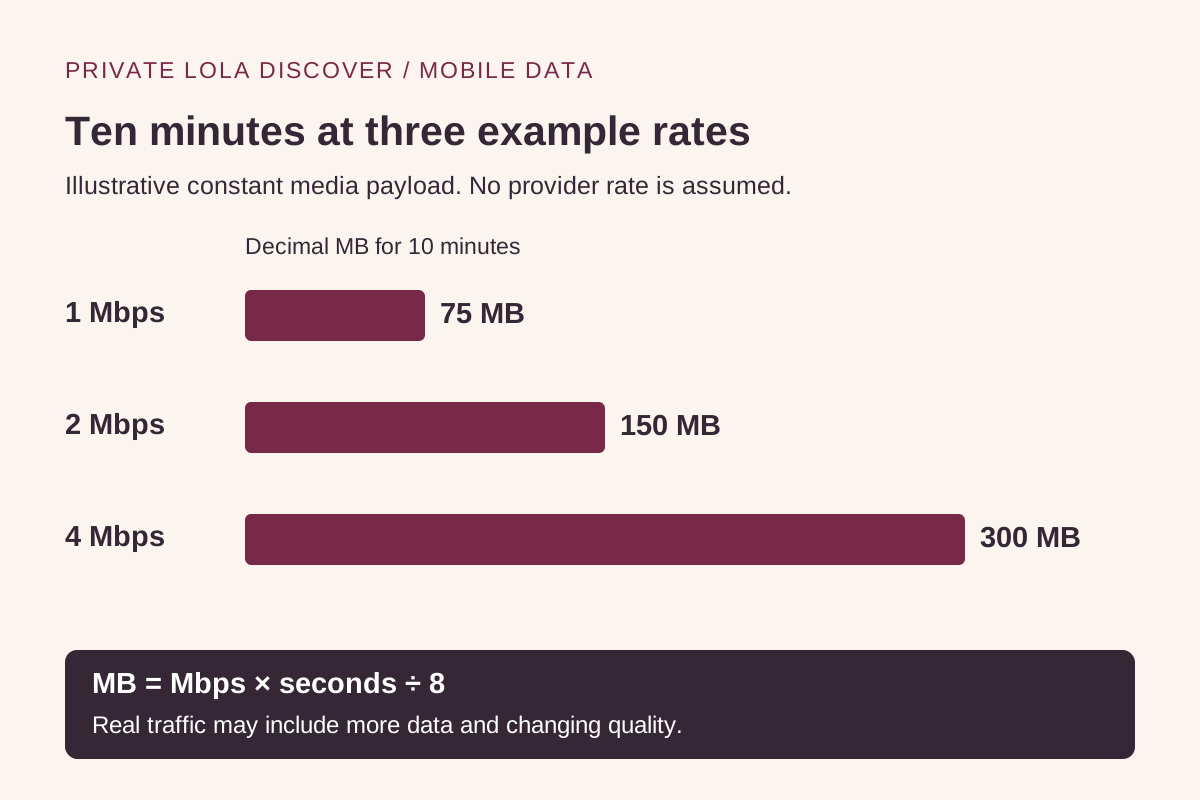
The illustration uses three invented, constant media bitrates for ten minutes: 1, 2 and 4 megabits per second. Using decimal units and eight bits per byte, the corresponding payload amounts are 75, 150 and 300 megabytes. These are arithmetic examples, not PrivateLola measurements, recommended quality settings or promises about an available room.
The calculation is bitrate in megabits per second multiplied by seconds, divided by eight, giving decimal megabytes. For example, 2 × 600 ÷ 8 = 150 MB. Doubling time doubles the example’s payload, just as doubling a constant bitrate does. That comparison helps explain why both duration and media settings matter.
Real traffic can include audio, page resources, connection overhead and changes in the stream. A two-way session may also involve an upload. An adaptive stream need not stay at the example’s rate, and a device counter may use different display units. Treat the chart as a way to understand scale, never as a bill prediction or a safe limit to spend down to zero.
Read the saving-mode label in its own device context
Apple says Low Data Mode can be set separately for mobile and Wi-Fi connections and may reduce streaming quality. Google says Pixel Data Saver restricts much background mobile traffic, while active apps and services can still use mobile data. Neither description establishes a room’s maximum consumption.
That means the useful question is which setting is active for the connection you intend to use. Check the official instructions for your device and software version. Do not copy another person’s menu path without confirming it applies. A familiar savings icon should prompt a configuration check rather than replace one.
Make the decision before a paid session. If your allowance is too small or the behavior remains unclear, postpone streaming until you have a suitable connection. Avoid starting a room merely to discover whether the remaining data is enough. This guide does not recommend bypassing regional access rules or turning off privacy protections to make a connection work.
Apple Support: Low Data Mode on iPhone and iPad · Google Pixel Help: Data Saver and active apps
Use counters as observations, not a complete invoice
Google’s Pixel documentation distinguishes the phone’s usage measurement from the carrier’s measurement and advises checking carrier plan limits. Use the provider of your mobile plan to establish its billing period, remaining allowance and relevant roaming conditions. We cannot establish those conditions from a directory visit.
If you choose to make a short test using permitted, non-sensitive content, note the connection, start time and displayed counter before and after. Close unrelated media first. The difference is an observation of that setup during that interval; it is not a universal per-minute rate. Leave room for measurement delays and other traffic.
Keep your notes minimal: duration, connection type and the counter change are enough for a planning comparison. There is no need to save room names, account details, screenshots of private conversations or payment information. Do not send those records to this directory to request a data estimate.
Write two separate stop conditions
Before proceeding, decide when you will stop for network use and when you will stop for provider spending. The first might be a short time boundary on a connection you understand. The second depends on the destination’s confirmed session unit, current rate, minimum commitment and checkout terms. An unused credit balance does not extend a mobile allowance.
A useful decision note could read: connection confirmed, plan checked, session length chosen, provider billing unit still unconfirmed. That last item is a reason to clarify the provider’s terms before committing. A complete network plan does not resolve an incomplete purchase decision.
When finished, leave the room using its controls and confirm the session ended. Read our credits-and-prices guide for the provider-side questions and the account-and-privacy guide before supplying personal information. The aim is a visit with boundaries you chose deliberately, supported by information from the parties that actually control the network and room.